
Once in a while a customer asks how we would update the bootloader itself, if needed? Well, the short answer is: Usually you don’t.
Torrox provides bootloaders off-the-shelf for STM32 and C2000 microcontrollers. These bootloaders are flashed onto the device during production and then sit there for the rest of the device’s life to enable the update of the firmware.
Longer answer: But if you really, really need to, I would write a small firmware that has the new bootloader embedded and that would then erase the old bootloader and install the new bootloader that was embedded in that small firmware.
Step by Step
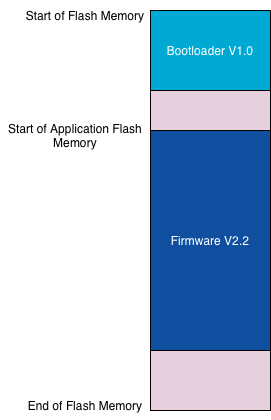
Initially, we have a firmware (version 2.2) on a device with bootloader version 1.0 and we want (for whatever reason) to update this bootloader to version 1.1.
We build a firmware, a bootloader updater, and give it version V99.99 to clearly mark this version as something that is something special. Any firmware update process could use this version information to see that the bootloader updater is correctly installed.
That firmware contains the new version of the bootloader:
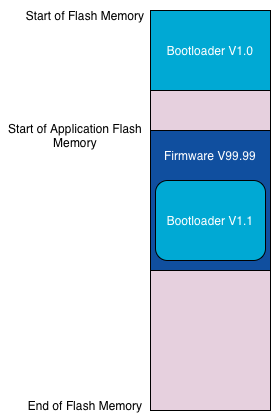
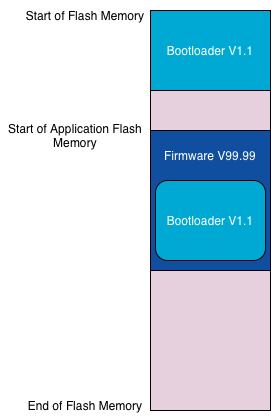
Once firmware V99.99 has been correctly installed by bootloader V1.0, it compares the embedded bootloader binary with the installed bootloader at “Start of Flash Memory”. If there are differences, that firmware (the bootloader updater) erases the bootloader and flashes the embedded bootloader:
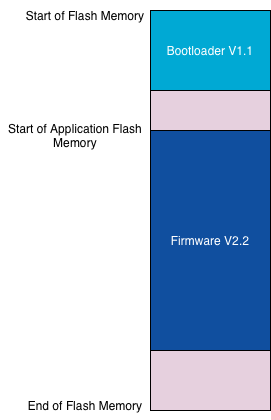
Once the new bootloader is installed, the new bootloader can be used to install the regular firmware again:
When Does Updating a Bootloader Make Sense?
We, and I guess all other authors of bootloaders as well, do our best to not have any bug in our bootloaders. However, should a bootloader have a bug that needs to be fixed, it’s good to have a plan for how to handle such situation.
There might be other reasons, such as adding a nice-to-have feature or supporting a new interface.
Caveats
When the bootloader updater installs the new bootloader, the old bootloader gets erased from flash memory and the new bootloader gets flashed. If that sequence is somehow interrupted, the device will be bricked.
Good News for our Customers
We are starting to add this bootloader updater to our standard deliveries with all new versions of our bootloaders! That means that customers do not only get new bootloader binaries with a new version, but also an updater to install the new bootloader on devices that already run our bootloader.